Brak produktów w koszyku.



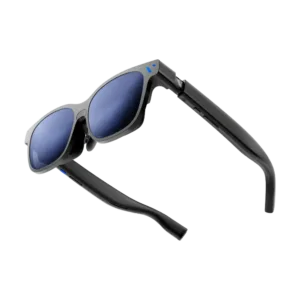
| Weight | 88 g |
|---|---|
| Material | Aluminium-magnesium (full-metal frame) |
| Connection | USB-C |
| Resolution per eye | 1920×1200 |
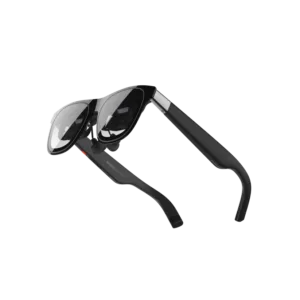
| Glasses type | AR glasses, display glasses |
|---|---|
| Brand | XREAL |
| Optical transparency | Yes |
| Requires a phone/host device | Yes |
| Controls | Buttons, Gesty (z XREAL Eye) |
| Built-in operating system | No |
| Use cases | Media, Work, Industry, Augmented reality |
| Vision correction | Prescription lens adapter |
| Built-in audio | Yes |
| Built-in camera | No |
| Connectors | USB-C |
| Display type | Flat birdbath micro-OLED |
| Resolution per eye | 1920×1080 |
| Field of view | 57° |
| Display brightness | 700 nit |
| Microphone | Yes |
| AI assistant | No |
| Weight | 87 g |
| Degrees of freedom | 3DoF |
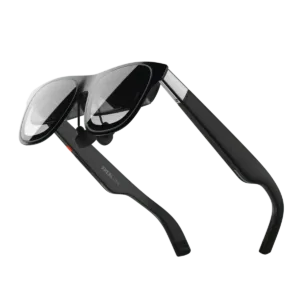
| Glasses type | AR glasses |
|---|---|
| Brand | XREAL |
| Optical transparency | Yes |
| Requires a phone/host device | Yes |
| Controls | Buttons, Gesty (z XREAL Eye) |
| Built-in operating system | No |
| Use cases | Media, Work, Industry, Navigation, Field service, Augmented reality |
| Vision correction | Optional |
| Built-in audio | Yes |
| Built-in camera | No |
| Connectors | USB-C |
| Display type | Birdbath micro-OLED |
| Resolution per eye | 1920×1080 |
| Field of view | 50° |
| Display brightness | 600 nits |
| Microphone | Yes |
| AI assistant | No |
| Weight | 84 g |
| Degrees of freedom | 3DoF |
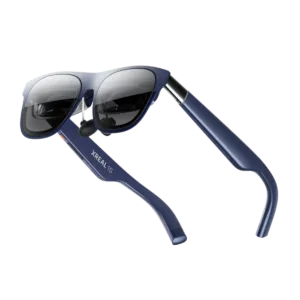
| Glasses type | AR glasses |
|---|---|
| Brand | XREAL |
| Display brightness | 700 nit |
| Optical transparency | Yes |
| Requires a phone/host device | Yes |
| Controls | Buttons, Gesty (z XREAL Eye) |
| Built-in operating system | No |
| Use cases | Media, Work, Industry, Navigation, Augmented reality |
| Vision correction | Prescription lens adapter |
| Built-in audio | Yes |
| Built-in camera | No |
| Connectors | USB-C |
| Display type | Birdbath micro-OLED |
| Resolution per eye | 1920×1200 |
| Field of view | 52° |
| Microphone | Yes |
| AI assistant | No |
| Weight | 82 g |
| Degrees of freedom | 3DoF |
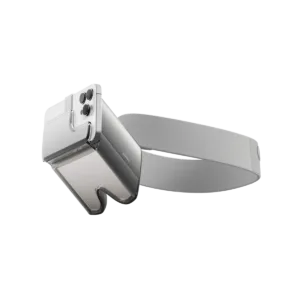
| Brand | HoloKit |
|---|---|
| Glasses type | AR attachment for iPhone |
| Display type | Optical passthrough (smartphone) |
| Field of view | 60° |
| AI assistant | No |
| Optical transparency | Yes |
| Built-in operating system | No |
| Requires a phone/host device | Yes (iPhone) |
| Weight | 215 g |
| Controls | Smartphone |
| Use cases | Education, Prototyping, Augmented reality |
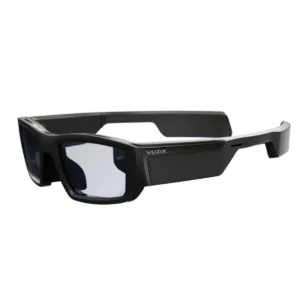
| Brand | Vuzix |
|---|---|
| Field of view | 20° |
| Display brightness | 2000 nit |
| Connectors | Bluetooth, USB Micro-B, Wi-Fi |
| Glasses type | Industrial AR glasses, Smart glasses |
| Display type | Waveguide (monocular) |
| Resolution per eye | 480×480 |
| Built-in camera | Yes |
| Built-in audio | Yes |
| Microphone | Yes |
| AI assistant | No |
| Optical transparency | Yes |
| Built-in operating system | Yes |
| Requires a phone/host device | No |
| Weight | 90 g |
| Controls | Touch, Voice |
| Use cases | Work, Industry, Field service |
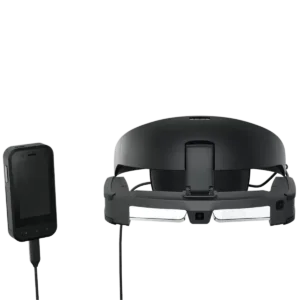
| Brand | Epson |
|---|---|
| Connectors | USB-C |
| Glasses type | Industrial AR glasses |
| Display type | Si-OLED waveguide |
| Resolution per eye | 1920×1080 |
| Field of view | 34° |
| Built-in camera | Yes |
| Built-in audio | Yes |
| Microphone | Yes |
| AI assistant | No |
| Optical transparency | Yes |
| Built-in operating system | Yes |
| Requires a phone/host device | No (BO-IC400N controller included) |
| Weight | 185 g |
| Controls | Touch, Controller, Buttons |
| Use cases | Work, Industry |

| Glasses type | AR glasses, smart glasses |
|---|---|
| Brand | Epson |
| Display brightness | 1000 nits |
| Optical transparency | Yes |
| Controls | Buttons, Controller |
| Built-in operating system | Yes (Android 9 on the controller) |
| Use cases | Media, Work, Augmented reality |
| Vision correction | Optional |
| Built-in audio | Yes |
| Built-in camera | Yes (13 MP in the controller; none in the glasses) |
| Requires a phone/host device | No (BO-IC400 controller included) |
| Connectors | 3.5 mm jack, USB-C |
| Display type | Si-OLED waveguide |
| Resolution per eye | 1920×1080 |
| Field of view | 34° |
| Microphone | Yes |
| AI assistant | No |
| Weight | 95 g |

| Glasses type | Industrial AR glasses, Smart glasses |
|---|---|
| Brand | RealWear |
| Optical transparency | No |
| Controls | Buttons, Voice |
| Built-in operating system | Yes |
| Use cases | Work, Industry, Field service, Navigation |
| Vision correction | None |
| Built-in audio | Yes |
| Built-in camera | Yes |
| Requires a phone/host device | No |
| Connectors | Bluetooth, 3.5 mm jack, USB-C, Wi-Fi |
| Display type | Monocular microdisplay |
| Resolution per eye | 1280×720 |
| Field of view | 24° |
| Microphone | Yes |
| AI assistant | No |
| Weight | 270 g |

| Glasses type | Display glasses, smart glasses |
|---|---|
| Brand | Viture |
| Display brightness | 1000 nits |
| Optical transparency | Yes |
| Controls | Buttons, Controller, Phone |
| Built-in operating system | No |
| Use cases | Media, Work |
| Vision correction | Built-in correction to −4.0 D; IPD 64 ± 6 / 68 ± 6 mm |
| Built-in audio | Yes |
| Built-in camera | No |
| Requires a phone/host device | Yes |
| Connectors | Magnetic, Pogo pin, USB-C |
| Display type | Birdbath micro-OLED |
| Resolution per eye | 1920×1200 |
| Field of view | 52° |
| Microphone | Yes |
| AI assistant | No |
| Weight | 79 g |

| Brand | Viture |
|---|---|
| Display brightness | 1000 nits |
| Connectors | USB-C |
| Glasses type | AR glasses (display) |
| Display type | Birdbath micro-OLED |
| Resolution per eye | 1920×1200 |
| Field of view | 50° |
| Built-in camera | No |
| Built-in audio | Yes |
| Microphone | Yes |
| AI assistant | No |
| Optical transparency | Yes |
| Vision correction | Built-in adjustment to −6.0 D |
| Built-in operating system | No |
| Requires a phone/host device | Yes |
| Weight | 77 g |
| Controls | Buttons |
| Use cases | Media |
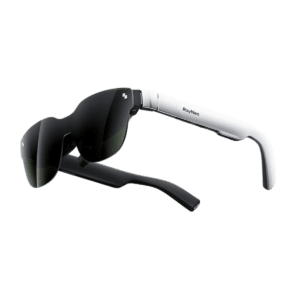
| Optical transparency | Yes |
|---|---|
| Brand | RayNeo |
| Controls | Buttons, Controller, Phone |
| Built-in operating system | No |
| Use cases | Media, Work |
| Vision correction | Prescription lens adapter |
| Built-in audio | Yes |
| Built-in camera | No |
| Requires a phone/host device | Yes |
| Connectors | USB-C |
| Glasses type | AR glasses (display) |
| Display type | Birdbath micro-OLED |
| Resolution per eye | 1920×1080 |
| Field of view | 46° |
| Display brightness | 650 nit |
| Microphone | Yes |
| AI assistant | No |
| Weight | 76 g |