Brak produktów w koszyku.



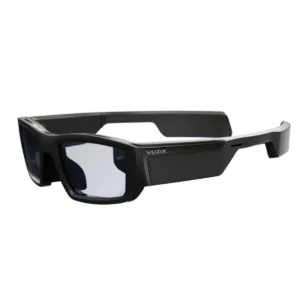
| Brand | Vuzix |
|---|---|
| Field of view | 20° |
| Display brightness | 2000 nit |
| Connectors | Bluetooth, USB Micro-B, Wi-Fi |
| Glasses type | Industrial AR glasses, Smart glasses |
| Display type | Waveguide (monocular) |
| Resolution per eye | 480×480 |
| Built-in camera | Yes |
| Built-in audio | Yes |
| Microphone | Yes |
| AI assistant | No |
| Optical transparency | Yes |
| Built-in operating system | Yes |
| Requires a phone/host device | No |
| Weight | 90 g |
| Controls | Touch, Voice |
| Use cases | Work, Industry, Field service |
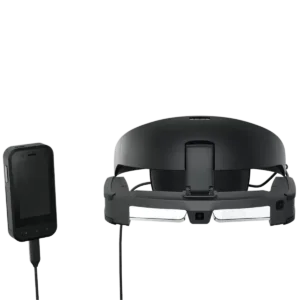
| Brand | Epson |
|---|---|
| Connectors | USB-C |
| Glasses type | Industrial AR glasses |
| Display type | Si-OLED waveguide |
| Resolution per eye | 1920×1080 |
| Field of view | 34° |
| Built-in camera | Yes |
| Built-in audio | Yes |
| Microphone | Yes |
| AI assistant | No |
| Optical transparency | Yes |
| Built-in operating system | Yes |
| Requires a phone/host device | No (BO-IC400N controller included) |
| Weight | 185 g |
| Controls | Touch, Controller, Buttons |
| Use cases | Work, Industry |

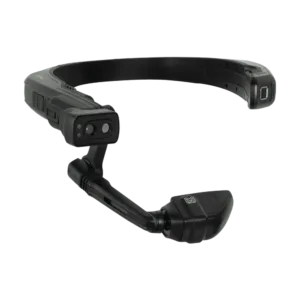
| Glasses type | Industrial AR glasses, Smart glasses |
|---|---|
| Brand | RealWear |
| Optical transparency | No |
| Controls | Buttons, Voice |
| Built-in operating system | Yes |
| Use cases | Work, Industry, Field service, Navigation |
| Vision correction | None |
| Built-in audio | Yes |
| Built-in camera | Yes |
| Requires a phone/host device | No |
| Connectors | Bluetooth, 3.5 mm jack, USB-C, Wi-Fi |
| Display type | Monocular microdisplay |
| Resolution per eye | 1280×720 |
| Field of view | 24° |
| Microphone | Yes |
| AI assistant | No |
| Weight | 270 g |
| Water resistance | IP66 |
|---|---|
| Operating system | Android |
| Built-in operating system | Yes |
| Resolution per eye | 854×480 |
| Field of view | 20° |
| Built-in camera | Yes |
| Stabilisation | Yes |
| Requires a phone/host device | No |
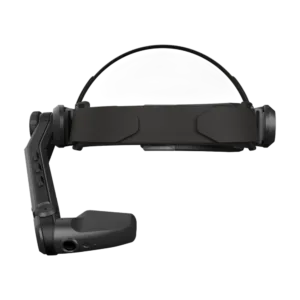
| Connectivity | Wi-Fi 6E |
|---|---|
| RAM | 6 GB |
| Storage | 128 GB |
| Display type | OLED |
| Display brightness | >2000 nit |
| Built-in camera | Yes |
| Photos (MP) | 12 MP |
| Frame rate (fps) | 60 fps |
| Video resolution | 1080p |
| Operating system | Android |
| Built-in operating system | Yes |
| Requires a phone/host device | No |
| Microphone | Yes |
| Built-in audio | Yes |
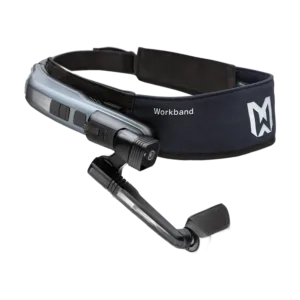
| Weight | 270 g |
|---|---|
| Photos (MP) | 48 MP |
| Frame rate (fps) | Up to 60 fps (1080p) |
| Video resolution | 1080p |
| Built-in camera | Yes |
| Additional feature | Replaceable battery |
| Connectivity | Bluetooth, Wi-Fi; storage expansion: microSD |
| Water resistance | IP66 |
| RAM | 4 GB |
| Screen type | LCD |
| Display type | LCD |
| Field of view | 20° |
| Resolution per eye | 854×480 |
| Operating system | Android |
| Microphone | Yes |
| Controls | Voice |
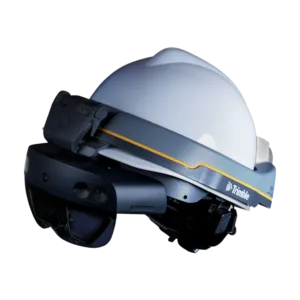
| Weight | 0.79 kg (XR10 only) / 1.25 kg with hard hat and mobiWAN_TR headset |
|---|---|
| Wi-Fi | 802.11ac 2×2 |
| Camera | 8 MP (photos), 1080p30 video |
| Optics | See-through holographic lenses (waveguide) |
| Speakers | Mobilus mobiWAN_TR Bluetooth bone-conduction headphones |
| Processor | Qualcomm Snapdragon 850 Compute Platform (base HoloLens 2 platform integrated into the XR10) |
| Bluetooth | 5.0 |
| Charging | USB-C, 18 W charger (9V/2A) — connector on the underlying HoloLens 2 platform |
| Microphones | 5-microphone array |
| Fit | Fits over prescription glasses |
| Depth sensor | 1 MP Time-of-Flight (ToF) sensor |
| Resolution | 2K, light engine with a 3:2 aspect ratio |
| Software | Trimble Connect for HoloLens — supports .SKP, .IFC, .RVT, .DWG, .DXF and other file formats; BIM model overlays, measurement tools and remote collaboration |
| Head tracking | 4 visible-light cameras |
| Operating humidity | 8-90% RH |
| Hard hat certifications | ANSI/ISEA Z89.1-2014 Type 1 Class E (OSHA compliant); CSA Z94.1; EN 397:2012+A1:2012; AS/NZS 1801; GB2811-2017 |
| Internal storage | 64 GB UFS 2.1 |
| Field of view (FOV) | 43° |
| Operating temperature | from +10°C to +27°C |
| Battery life | 2–3 hours of active use, up to two weeks on standby (base HoloLens 2 platform specification) |
| Visor certification | ANSI Z87.1-2015; CSA Z94.3-07; EN 166; AS/NZS 1337.1 |
| IP rating | IP50 (dust protection) |
| HoloTint accessory | Trimble HoloTint — an attachable visor that increases hologram contrast in bright or sunny conditions |
| Hard hat compatibility | Compatible with MSA V-Gard hard hats (Cap Style and Full Brim) with Fas-Trac III suspension |
| Accessory mounts | Standard industrial accessory mounts (earmuffs, chin straps and other third-party accessories) |
| Hand and eye controls | Enhanced hand and eye tracking sensors for automatic calibration and intuitive interaction with menus and holograms |
| Storage temperature | from -20°C to +60°C |
| Intrinsic safety | UL Class I, Division 2; UL 121201 and CSA C22.2 NO. 213 |
| Lens type | Waveguide |
| Built-in audio | Yes |
| Microphone | Yes |
| RAM | 4 GB |
| Depth sensing | Yes |
| Video resolution | 1080p |
| Eye tracking | Yes |
| Hand tracking | Yes |
| Optical transparency | Yes |
| Mixed reality | Yes |
| Built-in operating system | Yes |
| Requires a computer | No |
| Requires a phone/host device | No |
| Controls | Eyes, Gestures |
| Use cases | Industry, Augmented reality |
| Operating system | Windows |
| Connectors | Bluetooth, USB-C, Wi-Fi |
| Connectivity | Bluetooth 5.x, USB-C |

| USB | USB-C 3.0 |
|---|---|
| Weight | 95 g |
| Video | 1080p video recording at 60 fps; VP8, VP9, H.264, H.265 HEVC codecs |
| Camera | 16 MP, PDAF autofocus (4-axis), LED fill light, Class 2 laser pointer |
| Storage | 3 GB RAM / 32 GB internal storage |
| Battery | Built-in 750 mAh Li-Ion battery |
| Speaker | Built-in speaker, volume up to 90 dBA |
| Processor | Qualcomm Snapdragon 662, octa-core, 2.0 GHz (Kryo 260 CPU, Adreno 610 GPU) |
| Microphones | 2 digital microphones with active noise cancellation |
| Ruggedness | IP66, withstands drops from up to 2 m |
| Battery life | Up to 4 hours on one battery; up to 15 hours with an additional 5000 mAh battery |
| Operating system | Android 10 AOSP (Infinity OS), update to Android 13 announced |
| Operating temperature | -20°C to +50°C, 5–95% relative humidity |
| Voice control | Full voice control in 13 languages (including DE, EN, ES, FR, IT) |
| Wireless connectivity | Wi-Fi 802.11 a/b/g/n/ac (2.4 GHz and 5 GHz), Bluetooth 5.0 LE |
| Weight | 95 g |
| Connectors | USB 3.0, USB-C, Wi-Fi |
| Connectivity | Bluetooth 5.x, Bluetooth LE |
| Water resistance | IP66 |
| Video resolution | 1080p |
| Frame rate (fps) | 60 fps |
| Microphone | Yes |
| Built-in audio | Yes |
| Built-in camera | Yes |
| Operating system | Android |
| Built-in operating system | Yes |
| Controls | Voice |

| GPS | GPS/GLONASS |
|---|---|
| Weight | viewer module (display + camera + electronics) under 3.5 oz (approx. 99 g), excluding frames and battery |
| Speaker | integrated, up to 97 dB |
| Brightness | 5000 nits |
| Frames | Vuzix M-Series Rail (standard, without lenses); frames with lenses, safety glasses, a helmet mount, a headband and a Peltor mount are also available |
| Contrast | > 1000:1 (see-through) |
| Processor | Qualcomm XR1, 8 cores, 2.52 GHz |
| Bluetooth | Bluetooth 5.0 BR/EDR/LE |
| Charging | USB-C |
| Microphones | three, with noise reduction |
| Ruggedness | IP67 (All Weather Kit), withstands drops from a height of 1 m |
| Battery life | 2–12 hours, depending on the external battery selected |
| Certifications | IEC 60601-1-2:2014, electromagnetic compatibility (EMC) |
| Color depth | 24-bit |
| Resolution | 854×480 (WVGA) |
| Voice command languages | multilingual voice control (30+ languages, including Polish) |
| Motion tracking | 3DoF head tracking, 3-axis gyroscope, 3-axis accelerometer, 3-axis magnetometer/compass |
| Aspect ratio | 16:9 |
| Operating humidity | 0-95% RH |
| Internal storage | 64 GB |
| Operating temperature | -20°C to 45°C |
| Storage humidity | 0-95% RH |
| Storage temperature | 10-45°C |
| Device management (MDM) | MDM support from multiple partners |
| Wi-Fi | 2.4/5 GHz Wi-Fi, 802.11 a/b/g/n/ac |
| Video recording | up to 4K at 30 fps |
| USB connection | USB 3.1 Gen 2 (USB-C) |
| Tinted attachment | Tinted window overlay available |
| Camera features | PDAF autofocus, optical image stabilization, LED flash, barcode scanning |
| Photo resolution | up to 12.8 MP (photos) |
| Bluetooth audio profiles | HSP/A2DP |
| Field of view | 28° (przekątna), odpowiednik ekranu 9" oglądanego z 18" |
| The built-in battery | 135 mAh (internal, enables hot-swapping the external battery without interrupting operation) |
| External battery | 750 mAh, IP67 rating, 3-level LED indicator (All Weather Kit) or 4800 mAh (Extended Wear Kit) |
| Display technology | Transparent waveguide optics (see-through), DLP projection |
| Brand | Vuzix |
| Use cases | Industry |
| RAM | 6 GB |
| Controls | Touch, Voice, Buttons |
| Video resolution | 4K |
| Frame rate (fps) | 30 fps |
| Resolution per eye | 854×480 |
| Stabilisation | Yes |
| Degrees of freedom | 3DoF |
| Optical transparency | Yes |
| Lens type | Waveguide |
| Microphone | Yes |
| Connectivity | Bluetooth 5.x |
| Connectors | USB-C |
| Operating system | Android |
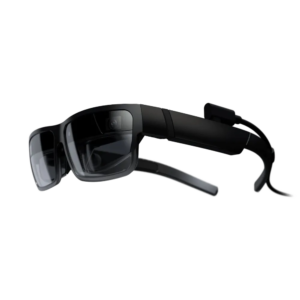
| Weight | 130 g |
|---|---|
| Brightness | 200 nits |
| Speakers | Integrated stereo speakers |
| Connectivity | USB-C with DisplayPort 1.4; detachable cable |
| Microphones | 3 built-in noise-cancelling microphones |
| Power supply | Powered by the connected device via USB-C |
| RGB camera | 8 MP RGB |
| Pixel density (PPD) | 45 PPD |
| Compatibility with computers | PC Edition: compatible computer with USB-C; up to 5 virtual displays with Lenovo Virtual Display Manager. A supported computer configuration is required |
| Tracking cameras | Two fisheye cameras for 6DoF tracking |
| RGB camera recording modes | 1080p at 30 fps; 730p at 30 fps; 480p at 60 or 30 fps |
| Compatibility with phones | Industrial Edition connects to select Motorola phones; a Qualcomm Snapdragon 800 series processor or newer and DisplayPort are required. ThinkReality solutions may require a software licence. |
| Durability and standards | IP54; compliance with ANSI Z87.1 |
| Software features | Voice, gesture, object and image recognition; head and eye tracking; barcode scanning; HDCP. Availability depends on the software |
| Prescription lenses | Optional prescription lens insert mounted on the nosepiece |
| Buttons and controls | + / − buttons: brightness or volume. PC Edition: select the function with the middle button; Industrial Edition: configure Select in A3 Companion |
| Frames and fit | Foldable design with cosmetic and industrial options; three nosepiece sizes and three temple tip sizes. |
| Refresh rate | 60 Hz |
| Industrial Edition software | Industrial Edition: ThinkReality Cloud Portal and the UDC, TR Home, A3 App Space, Hub and AR Cast apps |
| Built-in audio | Yes |
| Connectors | USB-C |
| PC connection | USB-C |
| Processor | Qualcomm XR1 |
| Microphone | Yes |
| Sensor | Fisheye, RGB |
| Degrees of freedom | 6DoF |
| Built-in camera | Yes |
| Frame rate (fps) | 30 fps, 60 fps |
| Video resolution | 1080p |
| Resolution per eye | 1920×1080 |
| Eye tracking | Yes |
| Controls | Gestures, Voice, Buttons |
| Refresh rate | 60 Hz |
| Vision correction | Optional |