


Brak produktów w koszyku.
AR glasses instead of a monitor: XREAL One Pro, XREAL One, 1S, Viture Luma, RayNeo Air 3S and ASUS ROG XREAL R1: comparison and buying guide
AR glasses instead of a monitor: XREAL One Pro, XREAL One, 1S, VITURE Luma, RayNeo Air 3S and ASUS ROG XREAL R1: comparison and buying guide

AR glasses can provide an extra screen for work, films and gaming. Connection requirements depend on the glasses, ports and source device. Below, we compare models in our catalog and the requirements of the complete kit.
How it works and what to expect
Virtual screen. The frames house two micro-OLED panels: one for each eye: with resolutions of 1920×1080 or 1920×1200 pixels. The image looks like a screen suspended a few meters in front of you. Manufacturers list screen sizes ranging from 147 to 174 inches, but these measurements are based on a viewing distance of 4 meters. In practice, what matters is the field of view: that is, how many degrees the screen covers: from 46° (RayNeo) to 57° (XREAL One Pro, ROG R1). The more degrees, the larger the screen appears without having to turn your head.
Connection. Direct video over USB-C requires DisplayPort video output and a compatible cable. A USB-C port alone is not enough. PS5 and Xbox require a compatible powered HDMI-to-USB-C adapter; for Nintendo Switch, check the solution specified by the glasses manufacturer.
Power. The glasses don’t have a battery. Power and video are transmitted via the same cable from your laptop or phone.
Display modes. A standard device display and a screen stabilized during head rotation are different features. XREAL One and One Pro have an X1 chip with native 3DoF. VITURE Luma Pro needs SpaceWalker for 3DoF and multiple windows; additional requirements depend on the operating system. RayNeo Air 3S receives video over a cable. Do not assume it has another RayNeo model's spatial modes.
No phone required: XREAL Beam Pro. This pocket-sized Android device with Google Play controls XREAL glasses. You can run Netflix, YouTube or a browser on it and place them in space as separate windows. Its 4300 mAh battery means it does not drain your phone. You can find the device details on the product page for XREAL Beam Pro.
Vision correction. Three options. First: a frame for prescription lenses that clips onto the eyeglass frames: the optician inserts lenses with your prescription into it. Second: a diopter adjustment dial built into the glasses themselves (Viture Luma and Luma Pro): this works only for nearsightedness. Third: contact lenses. You cannot wear your own glasses underneath any of these models.
A small HUD or glasses as a monitor?
Start with the task. A screen for films or a computer desktop, a small information display and a camera with AI features are different device capabilities. The name “AR glasses” or the abbreviation HUD does not confirm support for all of them.
The XREAL models in this guide receive video from a compatible device. For text work, check readability, fit and connection. Choose a small information display according to its specific apps, phone requirements and region; do not assume it replaces a computer desktop.
Meta Ray-Ban Display features have regional restrictions. Meta’s announcement of 23 September 2026 does not list Poland in the sales expansion, and specifies the new cycling and public transit directions for the US and Canada. Mirrored phone notifications were announced as coming soon. Before buying, confirm that the feature you need works for your country, account and app version.
Compare AI glasses with a display
Regional availability of features: Meta announcement
Connection requirements: XREAL documentation
Comparison by the Numbers
| Model | Display | Resolution / Refresh Rate | Field of view | Weight | Vision correction | What it’s for |
|---|---|---|---|---|---|---|
| Xreal One Pro | Sony micro-OLED, flat optics, 700 nits | 1920×1080 / 120 Hz | 57° | 87 g | eyeglass frame included | work, ultrawide, general-purpose |
| Xreal One | Sony micro-OLED, 600 nit | 1920×1080 / 120 Hz | 50° | 84 g | lens mount (optional) | work and films |
| Xreal 1S | Sony micro-OLED, 700 nit | 1920×1200 / 120 Hz | 52° | 82 g | lens mount (adapter) | working with documents (16:10) |
| Viture Luma Pro | Sony micro-OLED, 1000 nit | 1920×1200 / 120 Hz | 52° | 79 g | dial for up to −4.0 D | working with vision impairment |
| Viture Luma | micro-OLED, 1000 nits, dimmable lenses | 1920×1200 / 120 Hz | 50° | 77 g | dial for up to −6.0 D | watching movies with vision impairment |
| RayNeo Air 3S | micro-OLED, 650 nit | 1920×1080 / 60 or 120 Hz | 46° | 76 g | eyeglass frame included | movies on the go |
| RayNeo Air 3S Pro | micro-OLED, 1200 nit | 1920×1080 / 60 or 120 Hz | 46° | 76 g | lens mount (adapter) | first purchase, bright environments |
| ASUS ROG Xreal R1 | Sony micro-OLED, 700 nit | 1920×1080 / 240 Hz | 57° | 91 g* | lens holder included* | PC and console games, HDMI dock |
| Viture Beast | Sony micro-OLED, 1250 nits, dimmable lenses | 1920×1200 / 120 Hz | No data on the card | 88 g | No built-in vision correction; check prescription inserts | consoles, Steam Deck, ROG Ally |
Specifications from our shop’s product pages, as of 1 September 2026. *ROG R1 weight and prescription insert frame details come from the manufacturer’s website, as they are not listed on the product page.
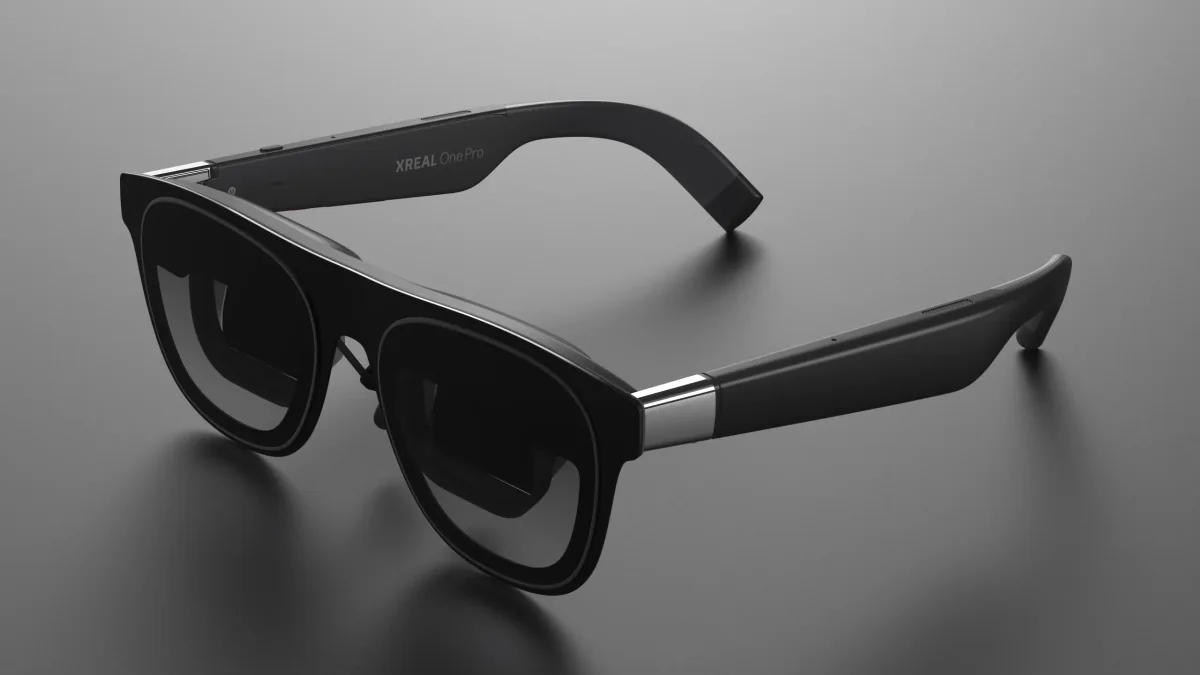
XREAL One or One Pro: screen and fit
Both models have X1 and native 3DoF. One has a 50° field of view, while One Pro has 57° and different optics. A wider field of view does not guarantee better text clarity or comfort for every user.
The manufacturer specifies a 59.5–70.5 mm IPD range for One. One Pro comes in M: 57–66 mm and L: 66–75 mm. Menu adjustment does not replace choosing the correct variant. Measure your pupil distance, check that you can see the entire image and specify the size before ordering.
When comparing offers, confirm the exact model, IPD variant, cable, prescription frame and lens-making cost. A frame without lenses is not a finished prescription solution. Also check the adapter for your device; the One Pro name does not mean a complete kit for every console.
For working on a laptop
Three factors determine whether you can work on it for several hours.
- Text sharpness at the edges. Field of view and resolution do not guarantee sharp text everywhere in the image. Before choosing, check spreadsheet or document readability with the frames fitted to your face, your interpupillary distance and any required vision correction.
- 16:10 aspect ratio. The XREAL 1S, Viture Luma, and Luma Pro have a resolution of 1920×1200: 120 more lines than Full HD. You can really tell the difference when working with documents and code.
- A stable screen. The XREAL One series keeps the image in place without any software. The 32:9 ultrawide mode displays two windows side by side, provided the computer supports this resolution.
For work, we choose Xreal One Pro. Xreal 1S offers a 16:10 aspect ratio and 700 nits of brightness, with a narrower field of view. If you need vision correction, check the dioptre adjustment on Viture Luma Pro.
Let’s be honest: this is a single Full HD screen. It replaces the monitor in a hotel or on a train, not the 27-inch 4K monitor on your desk. Increase the system font size by one level.
For gaming and consoles / Steam Deck
Steam Deck and ROG Ally require a compatible USB-C video output and cable. Check the connection specified by the glasses manufacturer and the video mode supported by the console and game. Panel refresh rate does not guarantee the same game frame rate or the absence of motion blur. One model to compare: Xreal One.
PS5 and Xbox transmit the image via HDMI. This is where ASUS ROG Xreal R1: the included dock has two HDMI 2.0 ports and DisplayPort 1.4, with 240 Hz, a 0.01 ms response time and Bose sound. You can connect a console and PC at the same time and switch without swapping cables.
Without the dock, a bright picture: Viture Beast offers 1250 nits and 9-step lens dimming, right down to a cinema-like blackout.
Brightness and included accessories: RayNeo Air 3S Pro: 120 Hz, 1200 nits, four speakers and a light-blocking cover in the box.
VITURE Luma Pro: console, dock and app
Luma Pro uses a USB-C cable with a magnetic connector at the glasses. The manufacturer lists direct connection to compatible Steam Deck and ROG Ally devices. For Switch/Switch 2, check the specified dock or adapter, revision and firmware. VITURE Pro Mobile Dock supports Switch 2 after the required update; One Mobile Dock is not compatible. PS5 and Xbox need an HDMI solution, such as Pro Mobile Dock.
A dock supplies video and power but does not add SpaceWalker to a console game. Luma Pro's 3DoF and multiple windows require a compatible app on the source device. For selected iOS features, the manufacturer lists an additional Adapter Pro/Ultra or Mobile Dock Mini. Check the feature, operating system and accessory as one setup.
For watching movies on the go
On a plane, what matters is weight, dimming, and whether your iPhone connects without an adapter.
- Lightest: RayNeo Air 3S and 3S Pro (76 g), Viture Luma (77 g), Luma Pro (79 g).
- Dimming: The Viture Luma and Beast have electrically tinted lenses. The XREAL One and One Pro offer three levels of transparency. The RayNeo Air 3S Pro has a snap-on cover.
- Audio: All models feature directional speakers, but you’ll still want to wear headphones in a quiet train car.
- 3D Movies: The XREAL 1S has a Real 3D feature that converts a regular movie into a 3D movie in real time.
For films, compare RayNeo Air 3S with XREAL One or One Pro, but price the whole connection: glasses, a compatible cable, any adapter and power. A phone without video output needs another compatible video source, such as the manufacturer's media player. Before travel, test the app you use, downloaded films, audio and charging. HDCP support in accessories does not guarantee every streaming app will work.
For people with vision impairments
- Nearsightedness up to −4.0 D: Viture Luma Pro, for −6,0 D: Viture Luma. Turn the dial and get a sharp image without needing an optician. Note: It does not correct astigmatism or farsightedness.
- Astigmatism, plus prescriptions, and higher minus prescriptions: lens frame. Take it to an optician along with your prescription. It’s included with the XREAL One Pro, RayNeo Air 3S, and ROG R1; for the XREAL One, 1S, and RayNeo 3S Pro, you’ll need to purchase an adapter separately.
- Interpupillary distance (IPD). XREAL One and both One Pro variant ranges are listed above. VITURE Luma Pro comes in Regular 64 ± 6 mm and Large 68 ± 6 mm. Select the specific variant and adjust the nose pads and temples; an IPD range does not guarantee clear edges for every face.
- Contact lenses address this issue in every model.
Things to watch out for
- Brightness. 600–700 nits (XREAL One, One Pro, 1S, R1) is sufficient in a room or on a train. Near a window in sunlight, 1000 nits (Viture Luma, Luma Pro) and 1200–1250 nits (RayNeo Air 3S Pro, Beast) perform better, as do photochromic lenses.
- Heat buildup and the host’s battery. After an hour, the frames around the temples feel warm: this is normal; if you feel discomfort, lower the brightness. The phone powers the glasses using its own battery, so bring a power bank for a long flight. Viture recommends taking a break after 3–4 hours.
- MacBook and iPhone. Check video output on the exact model and port rather than assuming compatibility from the series name or USB-C connector. For Lightning, manufacturers specify a separate adapter chain. Confirm HDMI-to-USB-C direction, power and glasses compatibility; an ordinary USB-C-to-HDMI adapter works in the opposite direction.
- Cable and charging. Use the cable specified for the exact model, with the correct glasses connector. It must carry video; a charging-only cable is insufficient. Charging a phone or console at the same time requires a compatible charging adapter or dock; adding a power bank alone does not establish video connectivity.
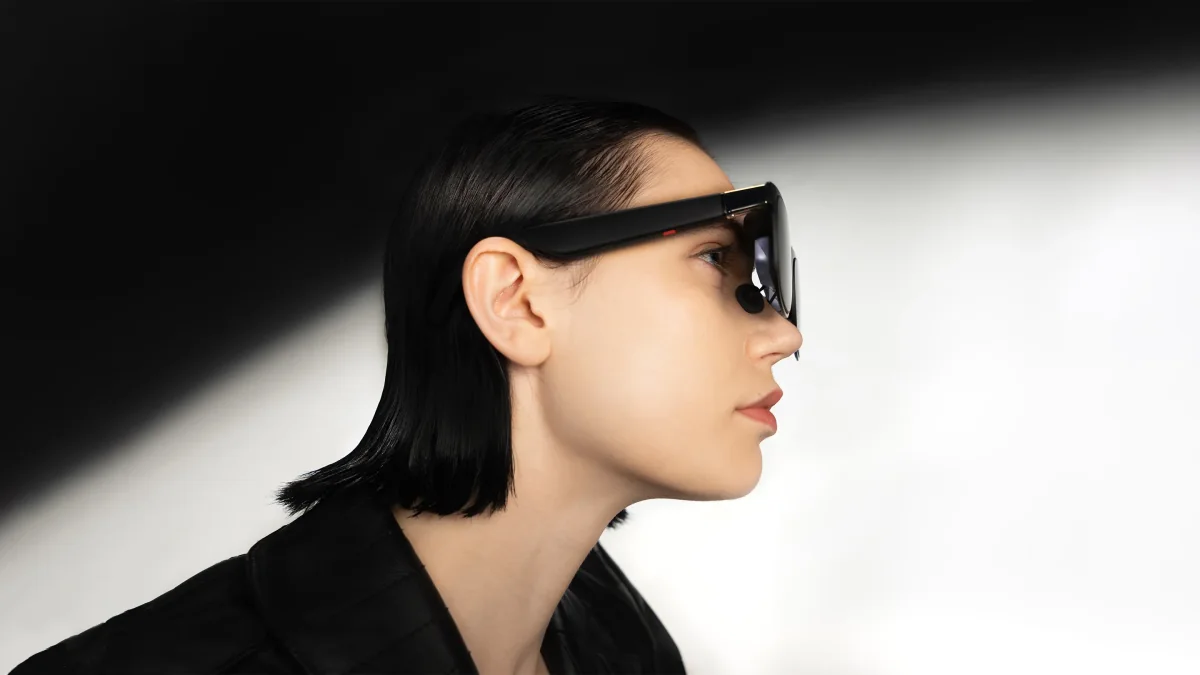
- Nose comfort. All the weight rests on your nose and ears. Each model comes with interchangeable nose pads; spending 15 minutes getting the fit right at the start saves hours of discomfort later. The 91 g R1 feels heavier than the 76 g RayNeo.
- Port with no video output. Many cheaper laptops have USB-C ports that are only for charging and data transfer. Check the specs for “DisplayPort Alt Mode” or look for the monitor icon next to the port.
What to provide before buying the complete kit
- The exact phone, laptop or console model and the video-output port you use.
- The glasses model, IPD variant and required prescription correction.
- The cable, adapter direction, power and charging while in use.
- Your film or work app, operating system, firmware and required mode: standard screen, 3DoF or multiple windows.
- The full cost of hardware, adapters and lenses, plus a video, audio and readability test before travel.
Include these details in your quote request. We confirm the variant, contents and availability of the specific kit. Do not treat a glasses model name alone as proof of compatibility with every device.
Verdict: Which model for what
- Working on a laptop: XREAL One Pro. If a 16:10 aspect ratio matters to you: XREAL 1S.
- Gaming on PC, PS5, Xbox: ASUS ROG XREAL R1. For Steam Deck: XREAL One or Viture Beast.
- Movies on the go and first purchase: RayNeo Air 3S Pro.
- Vision correction without a visit to the optician: Viture Luma (up to −6.0 D) or Luma Pro (up to −4.0 D).
- A screen without a phone or laptop: any XREAL glasses plus Beam Pro.
You can find all models in the category AR glasses with a display; industrial glasses for maintenance and manufacturing are covered in a separate guide.
Connection and variant documentation
- XREAL: One and One Pro displays and modes
- XREAL: IPD and variant selection
- XREAL: frame without lenses and kit contents
- RayNeo: connection and film playback
- RayNeo: compatible devices and adapters
- VITURE: Luma Pro, SpaceWalker and accessories
- VITURE: Mobile Dock versions and consoles
FAQ
What are AR glasses?
Glasses with small displays built into the lenses, through which you can still see your surroundings. The models in this comparison display images from a connected device: they function like a portable monitor. Industrial AR glasses (RealWear, Vuzix) have their own system and camera for use in maintenance and manufacturing; this is a different category.
Which are better: AI glasses or AR glasses?
Do not choose by the name alone. AI glasses may have a camera and assistant, and some models also have a small display. A small HUD does not mean a full screen for work. For films and a computer desktop, compare glasses that receive video from a compatible device; for photos, calls and short information, check the specific features and regional restrictions. Compare AI glasses in our catalog and the AR models described above.
What are the best AR glasses for working with a laptop?
Compare the compatible connection, readability of your document, IPD and full kit cost. XREAL One and One Pro have native 3DoF, with a wider field of view on One Pro. Luma Pro offers multiple windows through SpaceWalker on a compatible computer. Specifications do not guarantee comfort or replacement of every monitor.
Will AR glasses replace a monitor for everyday use?
They can provide an additional screen when travelling if the source device, port and cable are compatible. They do not replace every monitor: compare resolution, text readability, fit and the working modes of the specific kit. Models in this comparison have 1920×1080 or 1920×1200 per eye; that does not mean a 4K image.
Can I connect them to a PS5 or Xbox?
Check a kit compatible with the exact glasses and console: HDMI input, glasses output, power, resolution and refresh rate. Not every adapter works in this direction. For Luma Pro, the manufacturer specifies Pro Mobile Dock; ROG R1 has its own dock. A standard dock does not automatically provide an app's 3DoF mode.
Can I use them if I have a vision impairment?
Match the correction and size to your vision. Luma Pro adjusts myopia up to −4.0 D and Luma up to −6.0 D; this does not correct every vision condition. For other needs, confirm a compatible frame and lenses from an optician. A frame without lenses and a suitable IPD range do not guarantee a finished prescription solution or fit.
See the related guides: PICO Enterprise or Meta Quest for business.
Not sure which model is right for your laptop, phone, or console? Contact us : We’ll check port compatibility before you buy, select the right size based on your interpupillary distance, and issue a VAT invoice.

Author
Dariusz Walczak
Dariusz Walczak is responsible for marketing at Zenith XR. He manages the brand's communications and blog content.
Need specific advice?
Choose the right XR equipment for your needs
Tell us how you plan to use XR headsets. We will help you choose the right equipment for home, school or business.



Add comment